 US Dollar
 MXN
MXN
 Canada
 Europe







Product Description
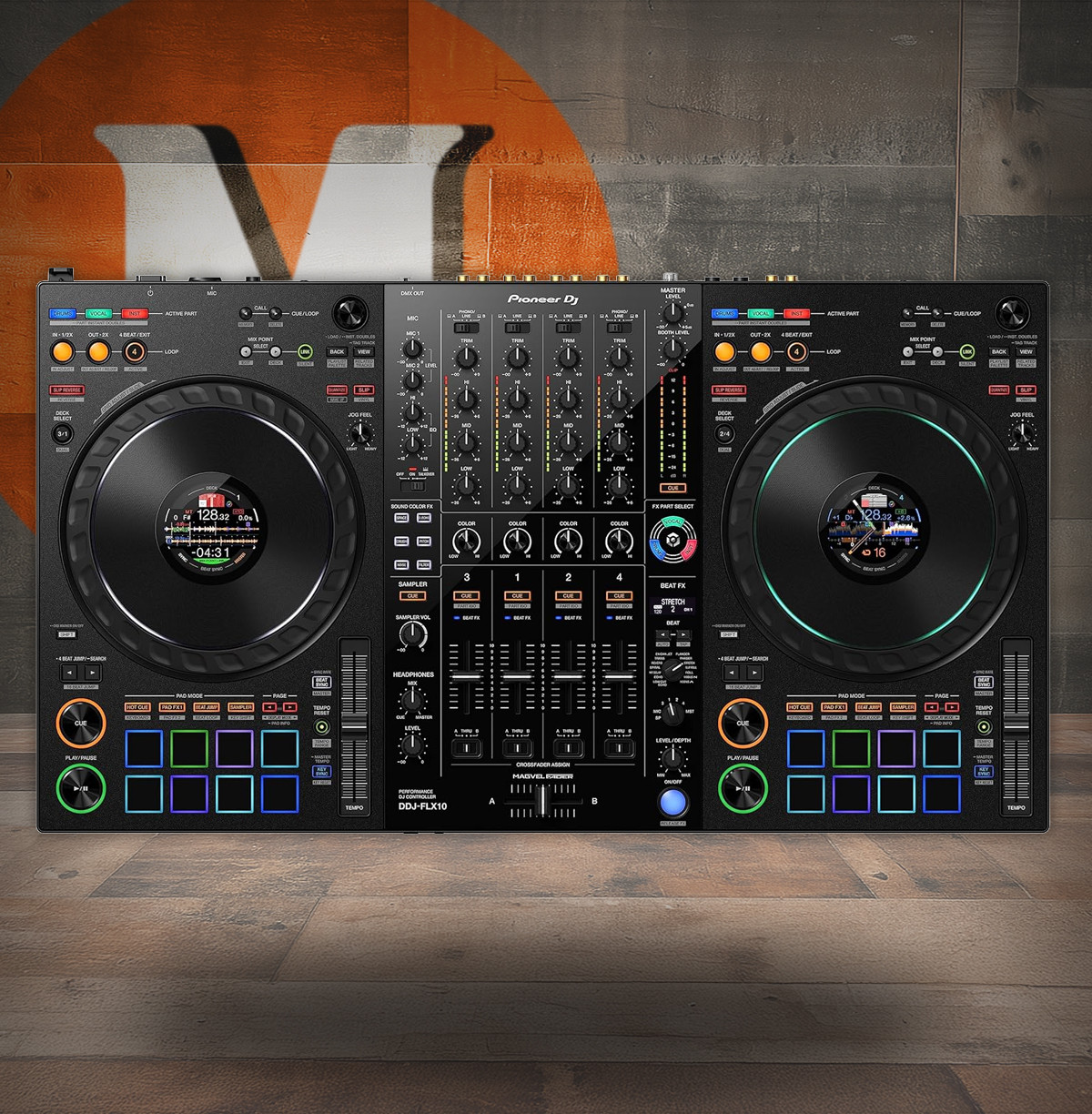
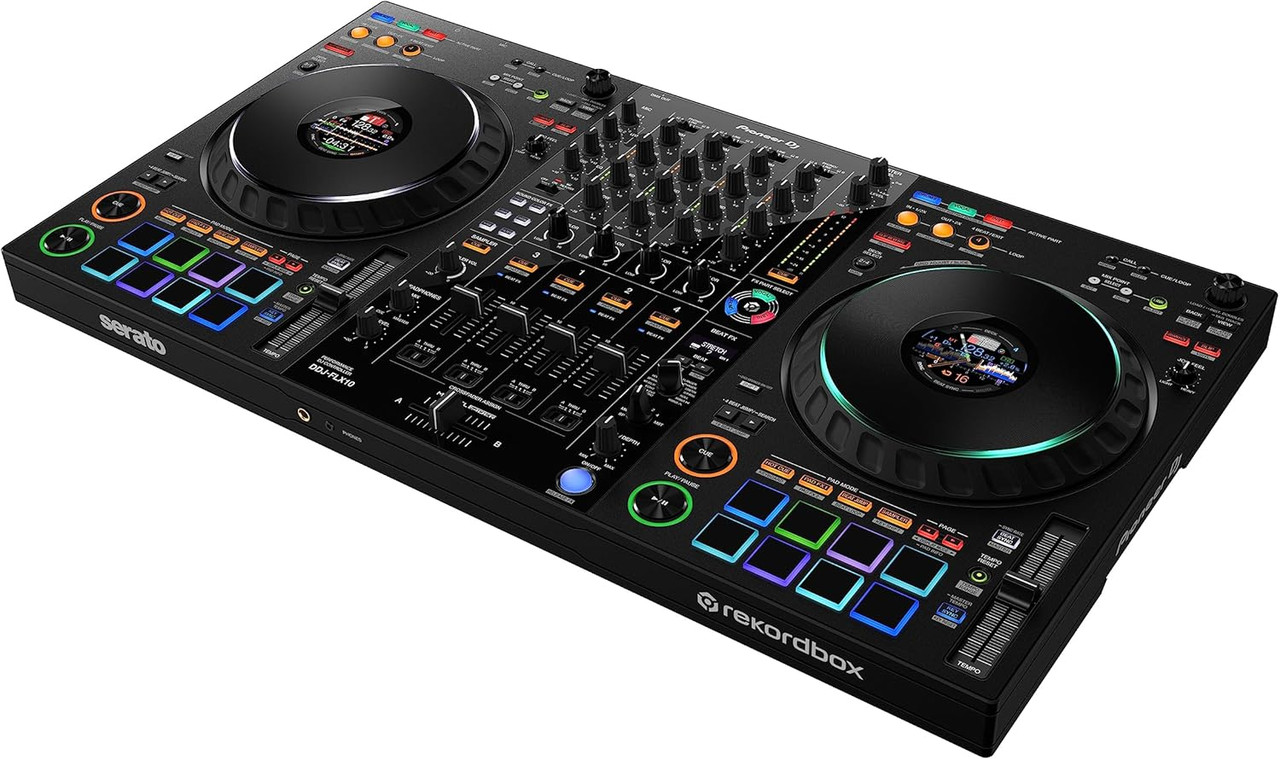
Pioneer DJ DDJ-FLX10: 4-Deck Stems Performance with Built-In DMX & On-Jog Telemetry
Split. Mix. Create. The DDJ-FLX10 is a 4-channel performance controller that opens up live remixing, mash-ups, and precision transitions without pre-editing tracks. Its Track Separation tools let you independently control vocals, drums, and inst (other instruments) on the fly, while color-coded buttons keep your focus on the music—not the laptop.
Keep your eyes on the decks. Expanded On Jog Display offers four visual modes—including 3-Band Waveforms (rekordbox)—so you can monitor waveforms, deck state, pad status, and even show artwork or your own logo. Pair that with Mix Point Link in rekordbox to trigger the next song exactly where the energy needs to shift—no counting, no guesswork—freeing your hands for creative Stems moves and FX.
Light the room from the controller. Drive DMX fixtures directly via the rear-panel XLR (3-pin) and the rekordbox Lighting function—no external interface required. An evolved MAGVEL FADER (4-sensor) delivers ultra-fine crossfader resolution, and dual USB-C ports make handoffs and B2B sets seamless. Plug-and-play with rekordbox and Serato DJ Pro (DVS available via respective plans), with compatibility for djay Pro (subscription) when your workflow calls for it.
Real-World Applications and Sound Roles
- Club mains: Four-deck control with Mix Point Link for tightly staged vocal-to-drop transitions.
- Mobile DJ shows: Integrated DMX output syncs lighting to music via rekordbox Lighting.
- Battle & scratch sets: 4-sensor MAGVEL FADER and Track Separation for creative, vocal-forward routines.
Where the DDJ-FLX10 Excels
- Live Mash-Ups: Split vocals, drums, and instruments to build blends without stems prep.
- Energy-Locked Transitions: Mix Point Link auto-cues the next track right at the musical moment.
- Eyes-Up Performance: On Jog Display surfaces waveforms, deck info, pads, or artwork/logo.
- Lighting-Driven Sets: Native DMX output controls fixtures through rekordbox Lighting.
- B2B & Changeovers: Dual USB-C ports streamline laptop swaps and back-to-back sets.
- Club or Mobile Deployments: XLR/RCA master + booth outs and dual mic inputs fit any rig.
- Scratch-Ready Mixing: 4-sensor MAGVEL crossfader enables micro-moves and tight cuts.
Control Modes for the DDJ-FLX10
Track Separation (STEMS) Controls
- Active Part & Part ISO: Adjust or fully mute vocals, drums, or inst independently.
- FX Part Select: Target specific parts with Beat FX or Color FX for musical emphasis.
- Part Instant Doubles: Throw a selected part to another deck for layering and performance tricks.
On Jog Display Modes
- Deck Info Mode: Overall waveform and deck status (Serato shows virtual deck).
- Waveform Mode: Zoomed dual-deck waveforms for precise beat and phrase alignment.
- Artwork Display: Show the current track’s artwork on the jog.
- DJ Logo Display: Display your logo or image via the Image Transfer Tool.
Performance Pad Sets
rekordbox: Hot Cue, Pad FX 1, Beat Jump, Sampler, Keyboard, Pad FX 2, Beat Loop, Key Shift.
Serato DJ Pro: Hot Cue, Pad FX, Beat Jump, Sampler, Pitch Play, Roll, Auto Loop, Key Shift.
Beat FX & Sound Color FX
Beat FX: Low Cut Echo, Echo, Multi Tap Delay, Spiral, Reverb, Trans, Enigma Jet, Flanger, Phaser, Stretch, Slip Roll, Roll, MOBIUS (Saw), MOBIUS (Triangle).
Sound Color FX: Space, Dub Echo, Crush, Pitch, Noise, Filter.
Lighting & I/O Control
- DMX Output: 3-pin XLR DMX directly from the controller for rekordbox Lighting.
- USB Connectivity: 2 × USB-C for dual-system operation and handoffs.
- Audio & Mics: Master (XLR/RCA), Booth (¼? TRS), Headphones (¼? & 3.5 mm), 2 × Mic inputs.
- Decks & Channels: 4-channel mixer with 4-deck control and 206 mm jogs.
Track Separation & Stems Performance Playbooks
Turn full songs into playable parts—in real time. Treat vocals, drums, and inst as independent layers, then route, boost, mute, or effect-target each one without pre-made stems.
- Vocal Hook Swap: Mute drums and inst, loop the acapella phrase, and launch a new rhythm bed on Deck 2. Bring drums back under the vocal for a custom drop.
- Drumless Breakdown: Pull drums with Part ISO for a tension break, filter the inst, then slam drums + inst with an echo tail into the chorus.
- Inst-to-Inst Blend: Use Part Instant Doubles to throw only inst to another deck, layer chords, and ride a musical bed while you cut the live vocals.
Targeted processing: With FX Part Select, send Beat FX or Color FX to just the vocals, just the drums, or only the inst—so your echoes, filters, and flangers shape the part you intend.
On-Jog Vision & Multicolor Rings
Keep decisions under your fingertips. Choose Deck Info, dual-deck Waveform view, Artwork, or DJ Logo (via Image Transfer Tool). The multicolored jog ring can reflect which Stems part is active, helping you glance-and-act in loud booths and dark rooms.
- Phrase Framing: Use zoomed dual waveforms to time drops precisely while monitoring pad status on the jog.
- Branding Moments: Flip to logo display during mic work or transitions for a clean, pro look.
Mix Point Link — Hands-Free Musical Entries
Define “start here” moments in rekordbox (hooks, riffs, first downbeat). Link them so Deck 2 fires at the right bar and phrase—no countdowns, no guesswork—freeing both hands for Stems moves and FX.
- Set: Tag the outgoing track’s vocal end as your handoff cue.
- Link: Point the next track at its melodic entry—no clashing vocals.
- Perform: Ride Color FX on the outgoing inst while Mix Point Link rolls in the new groove.
Lighting Control via Built-In DMX Output
Run DMX fixtures straight from the controller’s 3-pin XLR and rekordbox Lighting—no external interface required. Map looks for intros, breakdowns, and drops, or let the software auto-adapt to the music.
- Intro Looks: Static color + slow moves to set the scene.
- Breakdown: Pull intensity, add subtle color shifts tied to filtered inst.
- Impact: Reintroduce drums with strobe accents or fast chases for the drop.
MAGVEL FADER (4-Sensor) — Micro-Motion Resolution
The crossfader’s 4-sensor design reads tiny movements for tighter cuts and smoother blends. Micro moves translate musically, so fast stabs, crabs, and feathered fades land exactly where your hands place them.
- Detail Work: Trim a single hi-hat hit without losing the groove.
- Blend Control: Ride the edge of the cut point for whisper-quiet layer builds.
Dual USB-C & Club I/O — Fluid Changeovers
Two USB-C ports enable seamless B2B and laptop swaps. Connect FOH with XLR, feed a booth monitor via ¼? TRS, and keep both ¼? + 3.5 mm headphone jacks ready for rapid checks.
- Handoff Flow: DJ B cues the next track while DJ A finishes a Stems routine—swap without silence.
- Mic-Ready: Two mic inputs keep emcees or announcements clear and present.
Software Ecosystem & DVS Paths
Plug-and-play with rekordbox and Serato DJ Pro, with DVS available via the respective plans. Prefer djay Pro? Connect with its subscription for hands-on control—the hardware adapts to your library and workflow.
- Library Agnostic: Move between platforms as gigs require without changing the controller.
- Stems Synergy: Combine Track Separation tools with your favored software features.
Pads, Beat FX & Sound Color FX — Instant Expression
Eight back-lit pads per deck put Hot Cues, Pad FX, Beat Jump, Sampler, and more at thumb’s reach (mode names per software). Sculpt moments with Beat FX like Low Cut Echo, Spiral, Reverb, Trans, Enigma Jet, and shape tone fast with Color FX: Space, Dub Echo, Crush, Pitch, Noise, Filter.
- Build Recipe: Filter inst + Low Cut Echo on vocals, then release drums for the hit.
- Cleanup Move: Crush + Filter a noisy layer while the next track’s hook arrives via Mix Point Link.
How to Deploy the DDJ-FLX10 in the Field
Fast Stage Setup (5-Step Flow)
- Place & Power: Set the controller on a stable surface with rear I/O accessible. Connect the AC adaptor and power cord to a conditioned outlet or power distro.
- Main & Booth: Run MASTER XLR to FOH. If needed, send MASTER RCA to a secondary zone/recorder. Feed the booth wedge via BOOTH 1/4? TRS and set an independent level.
- Headphones & Mics: Plug cans into 1/4? or 3.5 mm. Connect microphones to the XLR/¼? combo and/or ¼? input and set levels before opening house.
- Laptops: Connect your computer to USB-C Port 1. For B2B/changeovers, connect the second computer to USB-C Port 2 (don’t hot-swap during audio).
- Gain Stage: Set channel TRIM so peaks hit around -6 dB on channel meters. Keep MASTER near unity (0 dB) and trim booth to the room.
Lighting Integration (DMX via rekordbox Lighting)
- DMX Line: From the rear 3-pin XLR DMX port, go to your first fixture’s DMX IN. Daisy-chain downstream and use a terminator at the last fixture.
- Addressing: Set fixture addresses/profiles per your rig. Keep a patch list handy for quick tweaks.
- rekordbox Lighting: In Performance mode, open Lighting, load or build scenes, and bind looks to musical sections. Enable auto or manual scene triggering.
- Sync Practice: Use static looks for intros, dim/breakdown cues mid-song, and chase/strobe accents on drops. Test blackout behavior before showtime.
Track Separation (Stems) — Live Workflow
- Prep: Assign the color-coded Stems buttons to muscle memory (vocals, drums, inst). Decide which part will carry your transition.
- Build: Use Active Part/Part ISO to ride levels or mute elements for breakdowns. Target a single part with FX Part Select for echoes or filters without muddying the whole mix.
- Layer: With Part Instant Doubles, throw just the inst (or vocals) to another deck and loop it as a bed while you introduce the next track.
On-Jog Vision & Mix Timing
- Display Modes: Choose the jog readout that suits the room: Deck Info, Waveform (dual zoom for phrasing), Artwork, or DJ Logo (via Image Transfer Tool).
- Mix Point Link (rekordbox): Tag entry points for the incoming track (e.g., first hook) and link them to the outgoing song’s moment (e.g., vocal end) for automatically timed handoffs.
Software Paths (Choose Your Flow)
- rekordbox: Enable Performance mode, verify audio device = DDJ-FLX10, map Lighting if using DMX, and confirm Stems controls. Activate DVS if your plan includes it.
- Serato DJ Pro: Select the controller as the audio device, confirm pad modes and FX, redeem Pitch ’n Time DJ if desired, and enable DVS if licensed.
- djay Pro: With a subscription, set device to DDJ-FLX10 and verify transport/pad layers before doors.
Latency, Pads & FX Check
- Buffer Size: Start modest (e.g., 256) and lower only if the system is rock-solid. Prioritize stability over ultra-low latency in noisy power conditions.
- Pad Banks: Confirm Hot Cues, Beat Jump, and Sampler banks per deck. Save a fallback bank with utility cues (intro/outro, breakdown).
- FX Routing: Pre-select a “clean” Beat FX (Low Cut Echo) and a “hype” FX (Spiral/Reverb) and verify Color FX (Filter/Pitch) are centered before starting.
Deployment Recipes (By Gig Type)
- Club DJ: MASTER XLR to FOH, BOOTH to monitors, Mix Point Link for vocal-to-drop swaps, minimal mic compression at the desk, Stems for quick acapella blends.
- Mobile DJ: Use BOOTH as zone 2 feed if needed, lock power and USB runs, pre-program Lighting scenes for first dance/announcements, keep a wired mic as backup.
- Battle/Scratch: Lower crossfader curve per preference, verify 4-sensor response at the cut point, map a pad bank for cue-juggle routines, keep jog display on Waveform.
- Livestream/Recording: Send MASTER RCA to capture device, monitor via BOOTH for zero-latency cueing, set conservative buffer, and avoid redlining to keep the stream clean.
Pre-Show Checklist
- Power up chain in order: PA → subs/amps → controller → laptops; reverse for power down.
- Verify both USB-C paths pass audio; mute channel faders before swapping laptops.
- Walk the room on a radio track: gain, EQ, Lighting scenes, and mic clarity all verified.


